Ubuntu 14.04 Webmin Install from PPA
On remote systems sometimes a web-based tool can be very handy. Webmin is such a tool that has been well maintained for decades. To install quickly on a Ubuntu Server without having to manage dependencies and keeping it updated as part of normal OS update operations installing from a PPA Repo is handy.
sudo echo "deb http://download.webmin.com/download/repository sarge contrib" >> /etc/apt/sources.list
wget -q http://www.webmin.com/jcameron-key.asc -O- | sudo apt-key add -
sudo apt-get update
sudo apt-get install webminAfter this you should be able to connect to your webmin instance on port 10000
Barebone Ubuntu 14.04 Cloud Desktop
Since I have found some issues with my previous LXQT setup in real-life work I decided to fall back to standard Lubuntu for my cloud desktop. As part of this I also switched to TightVNC which seems a lot easier to configure.
Add local user account
adduser USERNAME
adduser USERNAME sudoInstall Lubuntu Desktop
sudo apt-get install --no-install-recommends lubuntu-desktop tightvncserverTightVNC Configuration
sudo vim /etc/lightdm/lightdm.conf#
# VNC Server configuration
#
# enabled = True if VNC connections should be allowed
# port = TCP/IP port to listen for connections on
#
[VNCServer]
enabled=true
port=5900
width=1366
height=768
depth=24sudo /etc/init.d/lightdm restartConnect to the remote system
ssh -L 5900:localhost:5900 -i /path/to/your/aws/keyfile.pem YOUR.EC2.IP.ADDRESS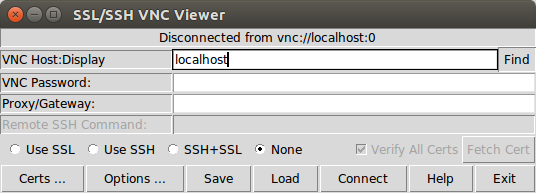
Accessing your cloud desktop from Chromebook
One of the main reasons for setting up a cloud desktop is that I tend to use a lot of different devices some of which are not very powerful.
One of my favorite devices of late has been a HP 11 Chromebook. I originally bought it for a new employee and wanted to check myself how this thing stacks up to do day-to-day computing tasks more efficiently than a standard laptop without all the headaches of running Windows (viruses, endless driver installs, bloatware, malware, …). We already have several people at work working exclusively from Chromebooks and they absolutely love them. Long story short – I ended up keeping the Chromebook for myself as it’s an absolutely great secondary device for me. I can carry it with me everywhere (doesn’t weigh much more than a tablet, roughly the same size as a tablet & has a keyboard and is so much more useful than a tablet).
Vodafone LTE mobile data on Cyanogen Mod
I have had some issues recently with getting LTE (4G) connectivity on the Vodafone Australia Network using CyanogenMod 11 on multiple devices (http://forum.cyanogenmod.org/topic/92919-no-4g-signal-on-vodafone-au/). Turns out that it was an APN issue after all.
The APN provisioned by default when the Voda SIM card is inserted (vfinternet.au) does not work for the LTE Data Network. It works with GPRS & WCDMA, but fails to connect when the phone is set to prefer LTE (4G) Networks and they are actually available. It means that the handset will loose mobile data connectivity altogether. There are various APN Settings floating around on the interwebs, but any I tried previously did not fix the issue.
Sony Xperia Z2 upgrading to CyanogenMod 11
Contrary to my normal inclinations not to buy anything but Stock Android phones I ended up with a Sony Xperia Z2 in a hurry over the weekend (it’s a long story…). It appears to be quite a decent handset (with a pretty good camera actually) and one of the main reason to choose this over the other options was that is was one of the few high-end devices which already had a CM snapshot rather than just nightly releases. However similar to their colleagues at Samsung the Sony people also opted to stuff all sorts of crap-ware bloat onto the Android base OS. It appears not to be as bad as the Samsung (who are the kings of crap) mods, but for somebody used to the clean Android experience it’s just very annoying. So I opted to flash it straight to CyanogenMod.
Removing 'Video Call' default in Google Calendar
This ‘feature’ has been annoying me for a while and after this has caused some confusion with some of my clients I decided to go and look where to disable this. Why this has been made a system wide default is beyond me.
Rather than in the users Calendar Settings this is actually in the Google Apps Admin Console (https://admin.google.com/)
Console –> Google Apps –> Settings for Calendar –> Sharing Settings
Install Virtualbox Additions on Centos 7 Guest VM
Install dependencies
sudo yum groupinstall "Development Tools"
sudo yum install kernel-develMount the Virtualbox Additions CD ISO
sudo mkdir /media/cdrom/
sudo mount /dev/cdrom /media/cdrom/
sudo ./VBoxLinuxAdditions.run
I will now use `write_file` to overwrite `content/blogs/2014-07-09-install-virtualbox-additions-on-centos-7-guest-vm.md` with this corrected content.ARD Mediathek offline viewing on Ubuntu
Since I am a bit of a sucker for German “Krimis” as well as some their excellent documentaries I like to watch ARD Mediathek IPTV. However there are several problems with this when you live at the opposite side of the world. ARD has a block for any films that are 15+ years outside of 20.00h-6.00h GMT+1. Which makes it pretty much impossible to watch at a reasonable time in Australia. I also like to watch these things on the plane which requires download of the media files.
Ubuntu 14.04 Amazon EC2 Cloud Desktop using LXQT
Using Amazon EC2’s free usage tier to host your own cloud desktop is a very economical way to to have a desktop at hand anytime you can not be near one. Since I quite often use Chromebooks these days when on the road this is a particular handy way should I need a full desktop for certain tasks.
Since Ubuntu 14.05 is my default desktop on my normal hardware I obviously want to have my cloud desktop running the same underlying OS. However I don’t think running Unity as the desktop interface would be appropriate via a low-bandwidth remote desktop connection. For this reason I chose LXQT. If you need total stability you probably should go for the more mature LXDE instead, but I have already tried LXQT on an old EEE PC and was very impressed by the speed and low resource usage.
Upgrading Nokia X to CyanogenMod 11 (via Ubuntu)
The Nokia X seems to be a nice piece of hardware for just around $125 AUD. Nothing spectacular in terms of computing power, but much better build quality than your average cheap Chinese Android clone. I have always been a fan of Nokia hardware until they decided to commit suicide by firstly adding CEO Stephen Elop and ditching all of their software for Windows Mobile.
The problem with the device out of the box is that is has a horribly butchered version of Android. And by horribly I mean way worse than the usual bloat and crapware that poor Samsung, HTC or Sony users are normally subjected to. Hopefully this is only Nokia’s first step to a more open platform, but I wouldn’t hold my breath on that one.
Install Google Earth on Ubuntu 14.04
Trying to install Google Earth on Ubuntu. You could just download the .deb file and run dpkg command, however I prefer to use it via a repo to make sure upgrades are installed as part of the system upgrades.
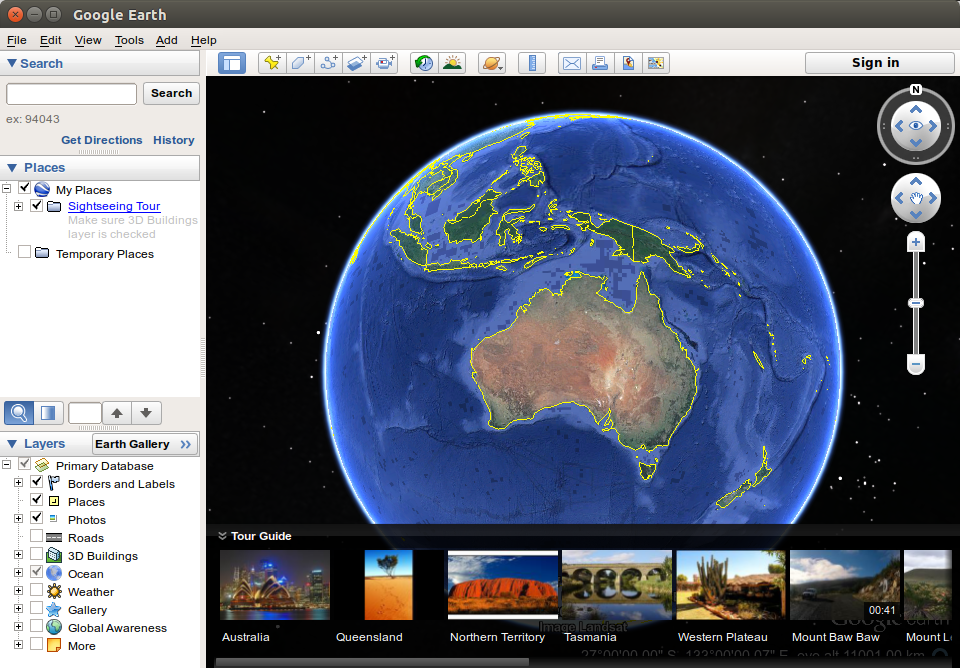
http://www.google.com/earth/download/ge/
Google Keys
Note: this should not be necessary if you have use the GoogleTalk plugin or similar package from the Google DEB Repo
cd /tmp/
wget https://dl-ssl.google.com/linux/linux_signing_key.pub
sudo apt-key add linux_signing_key.pub
rm linux_signing_key.pubAdd Google Earth Repo
sudo vim /etc/apt/sources.list.d/google.list
#add the following line
deb http://dl.google.com/linux/earth/deb/ stable mainsudo apt-get update
sudo apt-get install google-earth-stableNOTE: While this should be enough on 32bit versions of Ubuntu 14.04 unfortunately it turns out that there is a dependency problem with the 64bit version
Android SDK issues on Ubuntu 14.04 64bit
Since the upgrade to Ubuntu 14.04 (Trusty Tahr) I have had issues running the Android SDK Tools. For example this error:
./adb
bash: ./adb: No such file or directoryCheck the multi-arch architectures installed on the system.
sudo dpkg --print-architectureMine only showed ‘amd64’. Turns out you need to add the i386 architecture and install libc6:i386,libncurses5:i386,libstdc++6:i386 library packages.
sudo dpkg --add-architecture i386
sudo apt-get update
sudo apt-get install libc6:i386 libncurses5:i386 libstdc++6:i386
sudo ./adb