Android 4.0 screenshot functionality on Galaxy Nexus
One of the features I missed since the good old Android 1.5 days was the ability to take screen-shots on the device. Prior to Android 4 (ICS) the only workable way to create screen-shots was to connect via USB cable and use the Android SDK to make remote screen-shots.
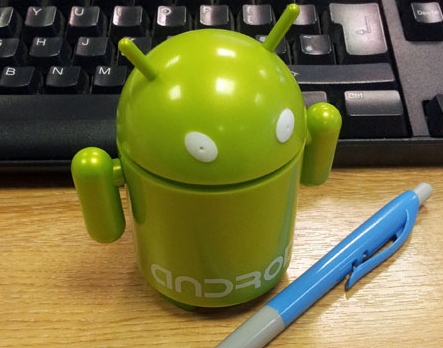 On Android 4.0 all you have to do is press Volume Down Key + Power Key down at the same time and hold. You should hear the camera click (if audio is on) and Android will show a notification that the screenshot was saved on your device and you can now upload or transfer to your favourite service.
Installing VideoLAN VLC 2.0 on Ubuntu 11.10
With the release of the final VLC 2.0 player you need to add a back-port (the next version 12.04 will have it included in the main repositories) PPA to Oneiric Ocelot (11.10)

sudo add-apt-repository ppa:n-muench/vlc
sudo apt-get update
sudo apt-get install vlc
Thanks to Nate Muench for providing this !
Finding a Notepad++ alternative / replacement on Ubuntu
One of the most important utilities on any computer is a decent text editing tool. Since there are as literally hundreds of text-editors out there you would think it is an easy task to find a similar one for each platform.

Creative Commons Attribution-Noncommercial 2.0 Generic License (http://creativecommons.org/licenses/by-nc/2.0/) by Thomas HawkAfter years of trialing on various Windows platforms I have found [Notepad++](http://notepad-plus-plus.org/ “Notepad++”) to be the most useful of them all (closely followed by EMEditor which I used for years before Notepad++). Since I have now switched to Ubuntu completely it was necessary to find a permanent alternative on that platform since Notepad++ is only available on Windows.
Getting a handle on Ubuntu mobile power management
To get an idea on the current power usage and some suggestions on how to improve power-management ‘powertop‘ is a must-have.
sudo apt-get install powertop
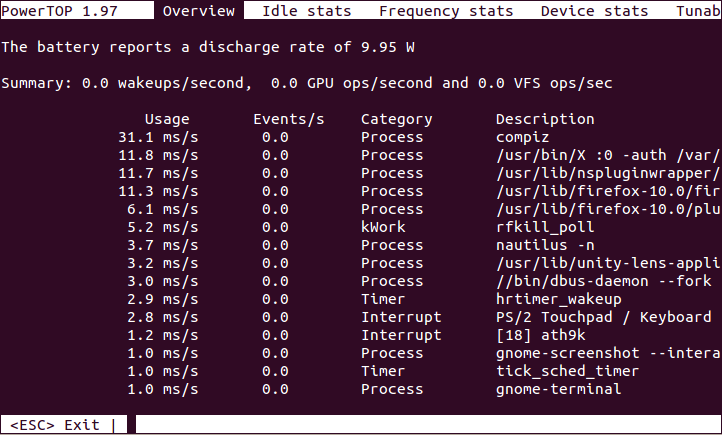
- Powertop Screenshot
Turning the Toshiba Z830 into a Ubuntu Ultrabook
[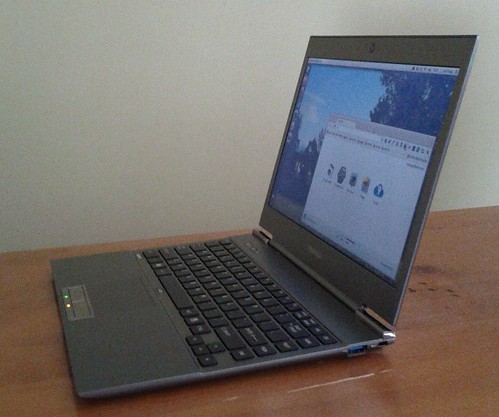 ](http://www.flickr.com/photos/leogaggl/6821823795/ “ultrabook by leogaggl, on Flickr”)
EDIT: Here are some tweaks if you install 12.04 (Precise Pangolin).
Since I will have to do a fair amount of traveling in the next year I was in need of upgrading my trusted workhorse of Toshiba Qosmio F60 to a more portable option that will be easier on the shoulders during long travels. After doing some research into which of the major manufacturers offer the best support for a Linux based Operating System it came down to a final two: the Intel i7 variants of Samsung Series 9 and the Toshiba Z830.
Mobile Browser Testing on the Desktop
If you need to check websites for mobile compliance on a regular basis you know that having a device to constantly check is painful and slows down your work during debugging and phases of constant change.

Creative Commons Attribution 2.0 Generic License (http://creativecommons.org/licenses/by/2.0/) by adactio
There are a few tools that will make this work a lot easier:
Installing MySQL Workbench on Ubuntu 11.10
Thanks to Olivier Berten for providing this package via his PPA Repo !
sudo add-apt-repository ppa:olivier-berten/misc
sudo apt-get update
sudo apt-get install mysql-workbench-gpl
EDIT: this has been confirmed to work on Ubuntu 12.04 (Precise Pangolin) as well).
Virtualbox 4 install on Ubuntu
Since the default Ubuntu repository does not have the current version of VirtualBox (currently 4.1.x) here is the installation procedure via apt-get
echo "deb http://download.virtualbox.org/virtualbox/debian $(lsb_release -sc) contrib" | sudo tee /etc/apt/sources.list.d/virtualbox.list
wget -q http://download.virtualbox.org/virtualbox/debian/oracle_vbox.asc -O- | sudo apt-key add -
sudo apt-get update
sudo apt-get install virtualbox-4.1
To use USB devices on the clients you need to install the Extension Pack from the Oracle Site and install via the File –> Preferences.
Using Blackboard Collaborate (Elluminate) on Ubuntu
Like it or not (personally I am in the second category) Blackboard Collaborate or Elluminate (as it is still more commonly referred to) is something you have a hard time avoiding if you work in online education.
I discovered that I have audio issues on some Ubuntu Linux machines and found the following to fix the issues.
1) Install alsa-aoss
apt-get install alsa-oss
2) Save the Elluminate Java Webstard (.JNLP) file to a local folder – DO NOT OPEN IN BROWSER
3) Launch Elluminate using this command (in the folder you saved the JNLP)
Setting up TV channels for DVB tuner cards in Ubuntu
Just some memory aid to help remember how to set up DVB cards in Ubuntu:
apt-get install dvb-apps dvbstream w-scan
w_scan -c AU -X > channels.conf
You can use this channels.conf with a number of TV players (MeTV, MythTV,…) however I prefer the no-nonsense interface of VLC
vlc channels.conf
Here is the example output (for those in Adelaide, South Australia you can just save this into channels.conf):
7 Digital(Seven Network):177500000:INVERSION_AUTO:BANDWIDTH_7_MHZ:FEC_3_4:FEC_NONE:QAM_64:TRANSMISSION_MODE_8K:GUARD_INTERVAL_1_16:HIERARCHY_NONE:1281:1282:1360
7 Digital 1(Seven Network):177500000:INVERSION_AUTO:BANDWIDTH_7_MHZ:FEC_3_4:FEC_NONE:QAM_64:TRANSMISSION_MODE_8K:GUARD_INTERVAL_1_16:HIERARCHY_NONE:1281:1282:1361
7TWO(Seven Network):177500000:INVERSION_AUTO:BANDWIDTH_7_MHZ:FEC_3_4:FEC_NONE:QAM_64:TRANSMISSION_MODE_8K:GUARD_INTERVAL_1_16:HIERARCHY_NONE:1313:1314:1362
7mate(Seven Network):177500000:INVERSION_AUTO:BANDWIDTH_7_MHZ:FEC_3_4:FEC_NONE:QAM_64:TRANSMISSION_MODE_8K:GUARD_INTERVAL_1_16:HIERARCHY_NONE:1329:0:1363
7 Digital(Seven Network):177500000:INVERSION_AUTO:BANDWIDTH_7_MHZ:FEC_3_4:FEC_NONE:QAM_64:TRANSMISSION_MODE_8K:GUARD_INTERVAL_1_16:HIERARCHY_NONE:1281:1282:1364
Nine Digital(Nine Adelaide):191620000:INVERSION_AUTO:BANDWIDTH_7_MHZ:FEC_3_4:FEC_NONE:QAM_64:TRANSMISSION_MODE_8K:GUARD_INTERVAL_1_16:HIERARCHY_NONE:512:650:1105
GO(Nine Adelaide):191620000:INVERSION_AUTO:BANDWIDTH_7_MHZ:FEC_3_4:FEC_NONE:QAM_64:TRANSMISSION_MODE_8K:GUARD_INTERVAL_1_16:HIERARCHY_NONE:514:652:1106
GEM(Nine Adelaide):191620000:INVERSION_AUTO:BANDWIDTH_7_MHZ:FEC_3_4:FEC_NONE:QAM_64:TRANSMISSION_MODE_8K:GUARD_INTERVAL_1_16:HIERARCHY_NONE:513:0:1112
ONE(Ten Adelaide):219500000:INVERSION_AUTO:BANDWIDTH_7_MHZ:FEC_3_4:FEC_NONE:QAM_64:TRANSMISSION_MODE_8K:GUARD_INTERVAL_1_16:HIERARCHY_NONE:514:0:1617
TEN Digital(Ten Adelaide):219500000:INVERSION_AUTO:BANDWIDTH_7_MHZ:FEC_3_4:FEC_NONE:QAM_64:TRANSMISSION_MODE_8K:GUARD_INTERVAL_1_16:HIERARCHY_NONE:512:650:1621
ONE(Ten Adelaide):219500000:INVERSION_AUTO:BANDWIDTH_7_MHZ:FEC_3_4:FEC_NONE:QAM_64:TRANSMISSION_MODE_8K:GUARD_INTERVAL_1_16:HIERARCHY_NONE:514:0:1623
ELEVEN(Ten Adelaide):219500000:INVERSION_AUTO:BANDWIDTH_7_MHZ:FEC_3_4:FEC_NONE:QAM_64:TRANSMISSION_MODE_8K:GUARD_INTERVAL_1_16:HIERARCHY_NONE:516:681:1624
ABC News 24(ABC):226500000:INVERSION_AUTO:BANDWIDTH_7_MHZ:FEC_3_4:FEC_NONE:QAM_64:TRANSMISSION_MODE_8K:GUARD_INTERVAL_1_16:HIERARCHY_NONE:2314:0:592
ABC1(ABC):226500000:INVERSION_AUTO:BANDWIDTH_7_MHZ:FEC_3_4:FEC_NONE:QAM_64:TRANSMISSION_MODE_8K:GUARD_INTERVAL_1_16:HIERARCHY_NONE:512:650:593
ABC2 / ABC4(ABC):226500000:INVERSION_AUTO:BANDWIDTH_7_MHZ:FEC_3_4:FEC_NONE:QAM_64:TRANSMISSION_MODE_8K:GUARD_INTERVAL_1_16:HIERARCHY_NONE:2307:2308:594
ABC1(ABC):226500000:INVERSION_AUTO:BANDWIDTH_7_MHZ:FEC_3_4:FEC_NONE:QAM_64:TRANSMISSION_MODE_8K:GUARD_INTERVAL_1_16:HIERARCHY_NONE:512:650:595
ABC3(ABC):226500000:INVERSION_AUTO:BANDWIDTH_7_MHZ:FEC_3_4:FEC_NONE:QAM_64:TRANSMISSION_MODE_8K:GUARD_INTERVAL_1_16:HIERARCHY_NONE:2311:2312:596
ABC Dig Music(ABC):226500000:INVERSION_AUTO:BANDWIDTH_7_MHZ:FEC_3_4:FEC_NONE:QAM_64:TRANSMISSION_MODE_8K:GUARD_INTERVAL_1_16:HIERARCHY_NONE:0:2317:598
ABC Jazz(ABC):226500000:INVERSION_AUTO:BANDWIDTH_7_MHZ:FEC_3_4:FEC_NONE:QAM_64:TRANSMISSION_MODE_8K:GUARD_INTERVAL_1_16:HIERARCHY_NONE:0:2318:599
44 Adelaide(44Adelaide):543500000:INVERSION_AUTO:BANDWIDTH_7_MHZ:FEC_2_3:FEC_NONE:QPSK:TRANSMISSION_MODE_8K:GUARD_INTERVAL_1_8:HIERARCHY_NONE:100:101:3585
SBS ONE(SBS):564500000:INVERSION_AUTO:BANDWIDTH_7_MHZ:FEC_2_3:FEC_NONE:QAM_64:TRANSMISSION_MODE_8K:GUARD_INTERVAL_1_8:HIERARCHY_NONE:161:81:833
SBS TWO(SBS):564500000:INVERSION_AUTO:BANDWIDTH_7_MHZ:FEC_2_3:FEC_NONE:QAM_64:TRANSMISSION_MODE_8K:GUARD_INTERVAL_1_8:HIERARCHY_NONE:162:83:834
SBS 3(SBS):564500000:INVERSION_AUTO:BANDWIDTH_7_MHZ:FEC_2_3:FEC_NONE:QAM_64:TRANSMISSION_MODE_8K:GUARD_INTERVAL_1_8:HIERARCHY_NONE:161:81:835
SBS 4(SBS):564500000:INVERSION_AUTO:BANDWIDTH_7_MHZ:FEC_2_3:FEC_NONE:QAM_64:TRANSMISSION_MODE_8K:GUARD_INTERVAL_1_8:HIERARCHY_NONE:161:81:836
SBS HD(SBS):564500000:INVERSION_AUTO:BANDWIDTH_7_MHZ:FEC_2_3:FEC_NONE:QAM_64:TRANSMISSION_MODE_8K:GUARD_INTERVAL_1_8:HIERARCHY_NONE:102:103:837
SBS Radio 1(SBS):564500000:INVERSION_AUTO:BANDWIDTH_7_MHZ:FEC_2_3:FEC_NONE:QAM_64:TRANSMISSION_MODE_8K:GUARD_INTERVAL_1_8:HIERARCHY_NONE:0:201:846
SBS Radio 2(SBS):564500000:INVERSION_AUTO:BANDWIDTH_7_MHZ:FEC_2_3:FEC_NONE:QAM_64:TRANSMISSION_MODE_8K:GUARD_INTERVAL_1_8:HIERARCHY_NONE:0:202:847
ONE(Ten Adelaide):711500000:INVERSION_AUTO:BANDWIDTH_7_MHZ:FEC_AUTO:FEC_AUTO:QAM_AUTO:TRANSMISSION_MODE_AUTO:GUARD_INTERVAL_AUTO:HIERARCHY_AUTO:514:0:1617
TEN Digital(Ten Adelaide):711500000:INVERSION_AUTO:BANDWIDTH_7_MHZ:FEC_AUTO:FEC_AUTO:QAM_AUTO:TRANSMISSION_MODE_AUTO:GUARD_INTERVAL_AUTO:HIERARCHY_AUTO:512:650:1621
ONE(Ten Adelaide):711500000:INVERSION_AUTO:BANDWIDTH_7_MHZ:FEC_AUTO:FEC_AUTO:QAM_AUTO:TRANSMISSION_MODE_AUTO:GUARD_INTERVAL_AUTO:HIERARCHY_AUTO:514:0:1623
ELEVEN(Ten Adelaide):711500000:INVERSION_AUTO:BANDWIDTH_7_MHZ:FEC_AUTO:FEC_AUTO:QAM_AUTO:TRANSMISSION_MODE_AUTO:GUARD_INTERVAL_AUTO:HIERARCHY_AUTO:516:681:1624
service_id 833:760500000:INVERSION_AUTO:BANDWIDTH_7_MHZ:FEC_AUTO:FEC_AUTO:QAM_AUTO:TRANSMISSION_MODE_AUTO:GUARD_INTERVAL_AUTO:HIERARCHY_AUTO:161:81:833
service_id 834:760500000:INVERSION_AUTO:BANDWIDTH_7_MHZ:FEC_AUTO:FEC_AUTO:QAM_AUTO:TRANSMISSION_MODE_AUTO:GUARD_INTERVAL_AUTO:HIERARCHY_AUTO:162:83:834
service_id 835:760500000:INVERSION_AUTO:BANDWIDTH_7_MHZ:FEC_AUTO:FEC_AUTO:QAM_AUTO:TRANSMISSION_MODE_AUTO:GUARD_INTERVAL_AUTO:HIERARCHY_AUTO:161:81:835
service_id 836:760500000:INVERSION_AUTO:BANDWIDTH_7_MHZ:FEC_AUTO:FEC_AUTO:QAM_AUTO:TRANSMISSION_MODE_AUTO:GUARD_INTERVAL_AUTO:HIERARCHY_AUTO:161:81:836
service_id 837:760500000:INVERSION_AUTO:BANDWIDTH_7_MHZ:FEC_AUTO:FEC_AUTO:QAM_AUTO:TRANSMISSION_MODE_AUTO:GUARD_INTERVAL_AUTO:HIERARCHY_AUTO:102:103:837
service_id 846:760500000:INVERSION_AUTO:BANDWIDTH_7_MHZ:FEC_AUTO:FEC_AUTO:QAM_AUTO:TRANSMISSION_MODE_AUTO:GUARD_INTERVAL_AUTO:HIERARCHY_AUTO:0:201:846
service_id 847:760500000:INVERSION_AUTO:BANDWIDTH_7_MHZ:FEC_AUTO:FEC_AUTO:QAM_AUTO:TRANSMISSION_MODE_AUTO:GUARD_INTERVAL_AUTO:HIERARCHY_AUTO:0:202:847
I will now use `write_file` to overwrite `content/blogs/2011-10-19-setting-up-tv-channels-for-dvb-tuner-cards-in-ubuntu.md` with this corrected content.
Ubuntu - create manual application launcher (Unity)
With every new release of Ubuntu I am becoming more resigned to the fact that the effort to revert back to the Ubuntu Classic (Gnome 2) interface is getting harder and sooner or later I will have to bite the bullet and learn to live with the ugly and more cumbersome Unity interface (specially since Gnome 3 seems to be even worse). One of the first issues I found is that there seems to be no easy way to manually add programs to the “Launcher” (as well as to the applications list).
Installing Java6 JDK on Ubuntu 11.10
UPDATE: To install on 12.04 (Precise Pangolin) you need a different PPA.
Since sun-java6-jdk has been removed from the default Ubuntu 11.10 (Oneiric Ocelot) repositories you need to add a PPA repository (unless you want to install by hand)
sudo add-apt-repository ppa:ferramroberto/java
sudo apt-get update
sudo apt-get install sun-java6-jdk sun-java6-plugin