Co-working in Australia
After reading an excellent article by Brad Reed on Network World (this seems to be the online version: Co-working: the ultimate in teleworking flexibility),�I finally got motivated enough to do some more research about this�phenomenum in the two places of interest to me (Austria and Australia)�as well as write a quick entry about this.
The whole co-working concept has been interesting me ever since it started, but the organisational issues associated with starting such a�venture (and as with everything else – a lack of time) have always�prevented any serious attempt to actually move in this direction. But�after reading some of the examples in the above mentioned article and�doing some further research I am starting to warm to the idea again.
Mobile 2D codes gathering pace (outside of Asia)
FINALLY !!! As somebody that has been experimenting with this technology for over 2 years now I am quite exited to see that the adoption of this technology is gathering some steem. While it has bee widely adopted in Asia for some years now, it has taken some time to get a foothold in the rest of the world this seems to be changing now. At least in Europe as I can see for myself at the moment. In my opinion with Nokia finally getting serious and throwing its (considerable) weight behind this technology (http://mobilecodes.nokia.com/) and some other industry heavyweights joining forces in the Mobile Codes Consortium.� This will hopefully produce one key outcome, the stadardisation of the label technology, which up to now has been one of the stumbling blocks that has kept people such as myself from adopting these codes in real-world projects. Along with the adoption by some major companies in their advertising this should produce the momentum that was needed to push mobile 2D codes into some broad adoption.
Seeing a students life from the other side again ....
Since my working world is centered a little more on educational topics at the moment (while attending ICL) I came across this Youtube Video which I think is a very good visual example of what’s commonly referred to as Education 2.0.
Personally I hope that I actually comprehend this and a good part of my working life is spend improving this situation. The fact that I am sitting in a ‘lecture’ myself and watching a Youtube video should hopefully illustrate that I am can (despite my actual age) understand the students perspective quite well. ;-
Using Nokia Mobile Webserver in an educational environment.
The ability to host your own content from your mobile phone opens some interesting possibilities to engage students and will allow the integration of user generated content in the education process. David Johnson from the University of Reading is working on serving portfolio data from your mobile.
Some of the current limitation of this approach:
-cost of the bandwidth
-speed
The ability to proxy the users content on the Mobile Web server Gateway as well as the ability to integrate content outside of the mobile phone seem to be the main points that will have to be improved for this to become a more mainstream technology. Another area of concern (or another potential use of this technology – depending on your viewpoint) is the backup of data from the mobile phone. The ability to proxy the content on the Gateway could also be used as a backup of the content that is hosted within the MWS on the mobile phone.
Configuring the Nokia E-Series SIP for Nodephone (Internode)
This is Part 3 of the Nokia SIP settings. This time for NodePhone (Internode – Australia). It has been hard to find this information (particularily the Registrar Server settings). NOTE: The Realm setting in the Registrar Server are CASE-SENSITIVE. For some screenshots check the ENGIN Australia setup entry.
General
Profile name: nodephone
Service profile: IETF
Default access point: {Your WLAN Access Point}
Public user name: sip:{NodePhone Phone No}@sip.internode.on.net
User compression: No
Configuring the Nokia E-Series SIP for sipgate.at
This is Part 2 of the Nokia SIP settings. This time for sipgate.at
(Austria), but it should also work for other SIPGate domains. It has
been hard to get this information from the providers themselves. For
some screenshots check the ENGIN Australia setup entry.
General
Profile name: sipgate
Service profile: IETF
Default access point: {Your WLAN Access Point}
Public user name: sip:{SIPGate UserID}@sipgate.at
User compression: No
Registration: When needed
Use security: No
Configuring the Nokia E-Series VoIP client for Engin Australia
Since I had to look all over�for the correct settings and there was a
lot of trial and error involved (specially for the Realm). Thanks to Engin Support that finally provided this info after logging a support request.
The screenshots are from a Nokia E65, but should be applicable for similar Nokia phones.
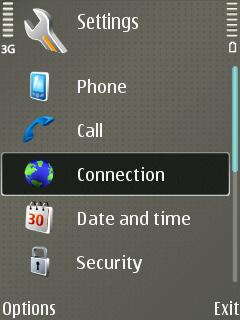
General
Profile name: engin
Service profile: IETF
Default access point: {Your WLAN Access Point}
Public user name: sip:{phone number}@voice.mibroadband.com.au
User compression: No
Registration: When needed
Use security: No
Zero dollar minimum spend post-paid phone plans in Australia
Since I had to do some research on this topic recently, here are the results that I have found. These plans are interesting for people that do not call out a lot, but rather use the phone to be accessible.
GoMobile – Pay as you go plans
Southern Cross Telecom – Pay as you go plans
AAPT – GO15 plan (**needs to be bundled with Landline phone)
** – some conditions apply to qualify for $0 minimum spend)