VoIP client for Ubuntu II
After upgrading to Ubuntu 11 (Natty) I did some further research on VoIP clients (SIP) for Ubuntu Linux as XLite seems horribly out of date now.
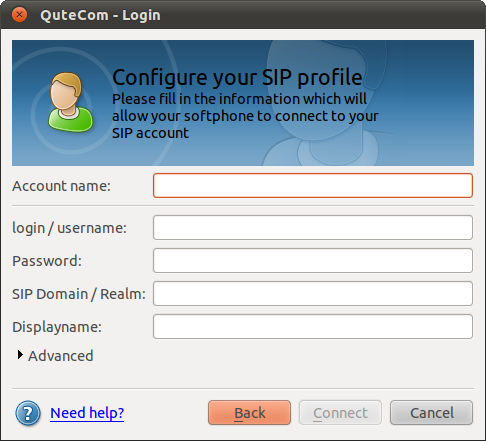
I came across QuteCom (formerly WengoPhone) and from first testing it seems to work quite well. The install is easy as it’s part of the Ubuntu Community Software (Universe) and that means it can be installed via apt-get, Software Center or Synaptic.
KeePass Version 2 on Ubuntu
EDIT: As of Ubuntu 11.10 (Oneiric Ocelot) this is now much easier as KeePass 2 has finally made it into the repositories
apt-get install keepass2
————————————————————————————————————-
If you need to read KeepPass 2 data files (.kdbx) on Ubuntu (as well as from other platforms such as Windows or Android) you need to run the Portable Version under Mono (.NET Runtime). Make sure you download the Portable Version 2.x from http://keepass.info/download.html
The default Mono Distribution on Ubuntu (V11 Natty) is missing a few dependencies required for KeePassX
My mobile personal learning environment
Taking part in MobiMOOC has given me the opportunity to take stock of my own MobilePLE – the top 5 tools I find most useful as part of my ongoing learning.
- Catch Notes (previously 3Bananas) – mobile note taking the most critical component. Whenever I get a new device – this is what has to be installed as one of the first actions. For those not familiar with this software – it’s like Evernote without the bloat.
- TwiDroyd – mobile Twitter / Status.Net client. This could be replaced by similar Twitter clients
- GoogleReader – RSS reader client
- Flickr – image upload and sharing
- FourSquare – location based sharing
These are the main applications I use pretty much constantly, however here are some other useful services I use regularily:
VoIP client for Ubuntu
Having used IP Telephony for a number of years I need a workable SIP client for all of the devices I use. I have found a very capable client for my Android phones (SipDroid) and on Windows/MacOSX I generally use X-Lite (as well as it’s paid version EyePhone) from Counterpath.
Having tried several different Linux SIP clients (Ekiga, Twinkle, …) but all discarded them because of weird UI’s and/or problems with stability I noticed that there is a Linux version of XLite available. Unfortunately on current versions of Ubuntu (10.04) it needs a deprecated version of a library.
Huawei K3765 on Ubuntu 10.04 (Lucid)
Since I have switched my 3G data network from Hutchinson Three to Vodafone AU recently I also upgraded the USB modem from a Huwaei E220 (which used to work fine on recent Ubuntu NBR releases on my trusty old ASUS EEE 900)
Unfortunately the new Huawei K3765 would not be recognised as a valid modem by the network manager. After a fair bit of searching it turns out that you only need to install one additional package (usb-modeswitch) to make this modem work (be recognised) on the current stable 10.04 release:
iPad Alternatives
Due to the hype generated by the recent launch and my reservations on using the Apple Inc. iTunes I was doing some research into alternatives to the proprietary and completely locked iPad device (and the associated lock-down to Apple’s iTunes Store). Hopefully this list can be of use for other people as well.
I can see the form factor and the tablet style with a cut down (mainly web-browser based) Operating System as useful in a number of settings not least in educational institutions and libraries.
Ubuntu - Google Mail (GoogleApps) as default mail client
Since Ubuntu 9.10 NetbookRemix has been released I am again finding myself using my trusty old ASUS EEE when on the road. And finally it seems I have found a vanilla Linux distribution that is reasonably responsive and works ‘out of the box’.
One thing I don’t need on the road (as a matter of fact on none of my equipment) is having to install & maintain some client/server mail client. Here is a workable solution to have your browser default ‘mailto:’ links to Google Apps.
Finding the ideal OS for (my) EEE PC
I have been a user of an EEE PC 900 for over 10 months now and in general very happy with the form-factor and it’s portability. I has been very useful in public transport, waiting rooms, coffee shops,…
However – in terms of Operating Systems I am now on my 3rd OS (despite initially telling myself that I will stick with the default and avoid tinkering) and it looks like I still have not found what I am looking for.
Testing mobile Twitter clients
Being out and about a lot, I am a fairly heavy user of my mobile internet plan (currently with Hutchinson 3). One of the more common tasks when there is some down-time while in transit or waiting for coffee is checking out what’s happening in the twittershere.
Personally (being a web-app developer for years) I generally prefer browser-based apps over ‘native apps’. Dont even get me started about J2ME apps. One of the main reasons for this preference is that I tend to switch handsets fairly frequently. This makes installing software on phones a large waste of time. Just copying your bookmarks (in my case I have made up my own custom start page on the device) saves a lot of time.
Open Source web conferencing tool
Came accross this project recently. Seems like an excellent tool for web meetings. Certainly something that we will give some more attention to as it seems to have some good integration with various products we are using such as Moodle and SugarCRM.