Quick ‘manual’ Eclipse install on Ubuntu
Since I always had trouble with the Eclipse version that is avaialable via the Ubuntu repositories I often need to install Elcipse on new machinery. Hence I am documenting the process for myself and hopefully it might help others as well.

Java dependencies install
sudo apt-get install openjdk-7-jre openjdk-7-jdk icedtea-7-plugin
Eclipse download
Note: download link needs to be updated – current as of 2014-01-27
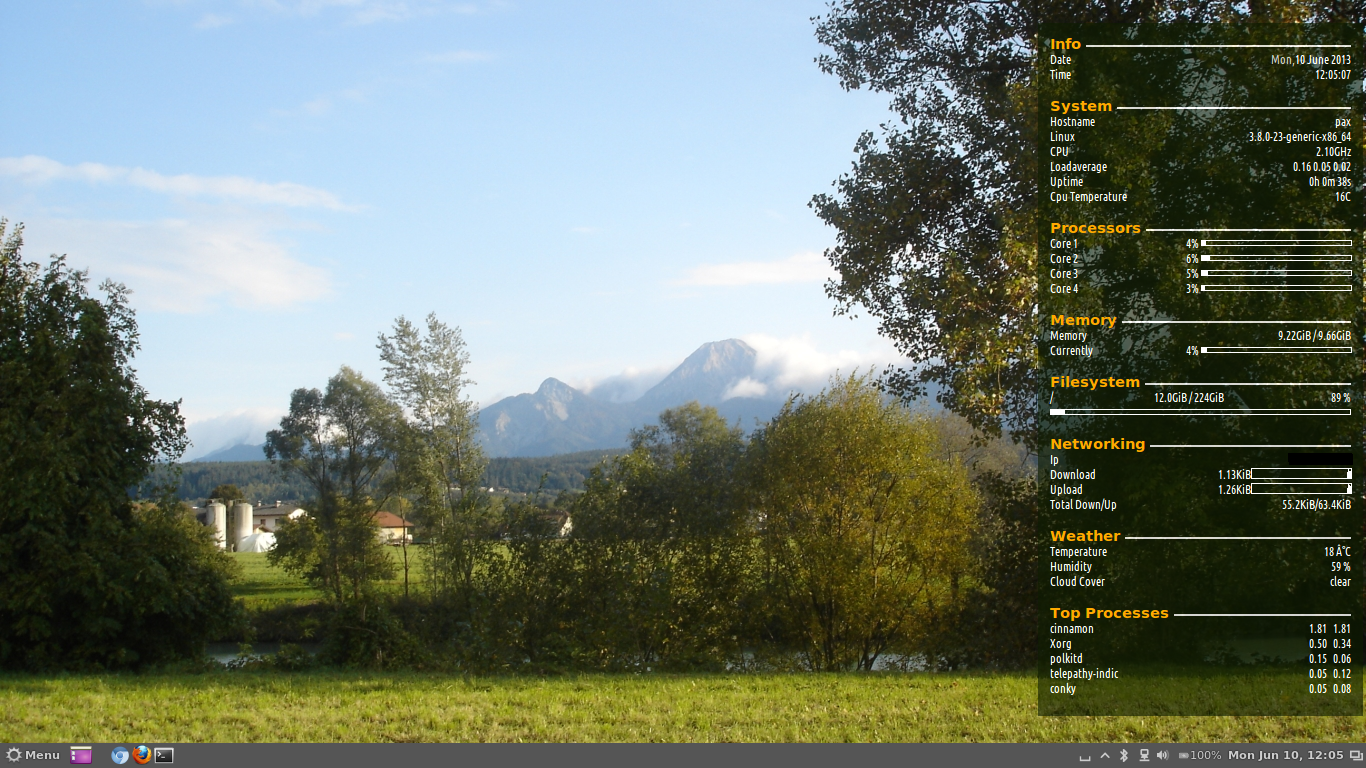
Simple conky system monitor configuration
Just a quick note on install and configuration of Conky.
Installation
sudo apt-get install conky conky-all hddtemp curl lm-sensors
sudo chmod u+s /usr/sbin/hddtemp
sudo sensors-detect
vim ~/.conkyrc
This is the content of my config file.
use_xft yes
xftfont Ubuntu Condensed:size=9
xftalpha 0.8
override_utf8_locale yes
update_interval 5.0
total_run_times 0
own_window yes
own_window_transparent no
own_window_argb_visual yes
own_window_argb_value 155
own_window_colour 081100
own_window_type normal
own_window_class conky-lgaggl
own_window_hints undecorated,below,sticky,skip_taskbar,skip_pager
#background yes
#out_to_console no
double_buffer yes
#max_user_text 32768
minimum_size 300
draw_shades no
draw_outline no
draw_borders no
draw_graph_borders yes
default_shade_color black
default_outline_color white
default_bar_size 150 5
default_gauge_size 20 20
imlib_cache_size 0
draw_shades no
alignment middle_right
gap_x 15
gap_y 15
border_inner_margin 10
no_buffers yes
uppercase no
cpu_avg_samples 2
override_utf8_locale no
default_color ffffff
color1 ffffff
color2 cccccc
color3 000000
color4 FFAA00
TEXT
${font UbuntuBold:bold:size=11}${color4}Info ${color2}${hr 2}${font}
${color1}Date ${alignr}${color2}${time %a,}${color}${time %e %B %G}
${color1}Time ${alignr}${color}${time %T}
${font UbuntuBold:bold:size=11}${color4}System ${color2}${hr 2}${font}
${color1}Hostname ${alignr}${color}${nodename}
${color1}${sysname} ${alignr}${color}${kernel}-${machine}
${color1}CPU ${alignr}${color}${freq_g}GHz
${color1}Loadaverage ${alignr}${color}${loadavg 1} ${loadavg 2} ${loadavg 3}
${color1}Uptime ${alignr}${color}${uptime}
${color1}Cpu Temperature ${alignr}${color}${acpitemp}C
${font UbuntuBold:bold:size=11}${color4}Processors ${color2}${hr 2}${font}
${color1}Core 1 ${alignr}${color}${cpu cpu1}% ${cpubar cpu1}
${color1}Core 2 ${alignr}${color}${cpu cpu2}% ${cpubar cpu2}
${color1}Core 3 ${alignr}${color}${cpu cpu3}% ${cpubar cpu3}
${color1}Core 4 ${alignr}${color}${cpu cpu4}% ${cpubar cpu4}
${font UbuntuBold:bold:size=11}${color4}Memory ${color2}${hr 2}${font}
${color1}Memory ${color}${alignr}${memeasyfree} / ${memmax}
${color1}Currently ${color}${alignr}${memperc}% ${membar}
${font UbuntuBold:bold:size=11}${color4}Filesystem ${color2}${hr 2}${font}
${color1}/ ${color}${alignc}${fs_used /} / ${fs_size /} ${color}${alignr}${fs_free_perc /} %
${color}${fs_bar 5,300 /}
${font UbuntuBold:bold:size=11}${color4}Networking ${color2}${hr 2}${font}
${if_existing /proc/net/route wlan0}${color1}Ip ${color}${alignr}${addr wlan0}
${color1}AP ${color}${alignr}${wireless_essid wlan0}
${color1}Signal ${color}${alignr}${wireless_link_qual_perc wlan0}${wireless_link_bar 10,100 wlan0}
${color1}Download ${alignr}${color}${downspeed wlan0}${downspeedgraph wlan0 10,100}
${color1}Upload ${alignr}${color}${upspeed wlan0}${upspeedgraph wlan0 10,100}
${color1}Total Down/Up ${alignr}${color}${totaldown wlan0}${color1}/${color}${totalup wlan0}
${else}${if_existing /proc/net/route eth0}${color1}Ip ${color}${alignr}${addr eth0}
${color1}Download ${alignr}${color}${downspeed eth0}${downspeedgraph eth0 10,100}
${color1}Upload ${alignr}${color}${upspeed eth0}${upspeedgraph eth0 10,100}
${color1}Total Down/Up ${alignr}${color}${totaldown eth0}${color1}/${color}${totalup eth0}${endif}${endif}
${font UbuntuBold:bold:size=11}${color4}Weather ${color2}${hr 2}${font}
${color1}Temperature ${alignr}${color}${weather https://tgftp.nws.noaa.gov/data/observations/metar/stations/ YPAD temperature} C
${color1}Humidity ${alignr}${color}${weather https://tgftp.nws.noaa.gov/data/observations/metar/stations/ YPAD humidity} %
${color1}Weather ${alignr}${color}${weather https://tgftp.nws.noaa.gov/data/observations/metar/stations/ YPAD weather}
${font UbuntuBold:bold:size=11}${color4}Top Processes ${color2}${hr 2}${font}
${color1}${top name 1} 	${alignr}${color}${top cpu 1} ${top mem 1}
${color1}${top name 2} 	${alignr}${color}${top cpu 2} ${top mem 2}
${color1}${top name 3} 	${alignr}${color}${top cpu 3} ${top mem 3}
${color1}${top name 4} 	${alignr}${color}${top cpu 4} ${top mem 4}
${color1}${top name 5} 	${alignr}${color}${top cpu 5} ${top mem 5}
Note: if you want to use this config file you want to at least change the METAR code (YPAD in my case) with one closer to you – see http://www.rap.ucar.edu/weather/surface/stations.txt.
Installing Ubuntu on Toshiba Z930 Ultrabook
Since I have been really happy with the performance and mobility on the Toshiba Ultrabooks (see previous blog entries) I have now chosen to stay with a tried brand and uprgrade to the Z930 i7 model.
Unfortunately this now comes with added hurdles by our good friends at Microsoft in the form of UEFI and the pre-installed disaster that is Windows 8. Instead of totally wiping the system as I did with the Z830 model I decided to install next to Windows 8 as lots of people have reported problems with the UEFI bootloader and the BIOS if you start messing with the pre-installed partitions (specially the EFI partition).
Using TOR and PRIVOXY on Ubuntu
This covers only the basic install and configuration for future reference. More info on Privoxy can be found on their website http://www.privoxy.org/.
Install
apt-get install tor privoxy
vim /etc/privoxy/config
uncomment the following line:
forward-socks5 / 127.0.0.1:9050 .
If you need to browse internal hosts while connected:
forward 10.*.*.*/
Browser Configuration
Firefox: FoxyProxy
Chromium: Proxy Switchy
Documentation: http://www.privoxy.org/faq/misc.html#TOR
OpenVPN - forward all client traffic through tunnel using UFW
By default OpenVPN only routes traffic to and from the OpenVPN Server. If you need all traffic from a client through the OpenVPN tunnel there are several options listed in the OpenVPN docs (http://openvpn.net/index.php/open-source/documentation/howto.html#redirect). Since I don’t have any control over the server in some cases I needed a client side solution. As I already have ufw running with Ubuntu I wanted to use the existing software.
Here is how to configure ufw to enable routing all traffic from your client machines through the OpenVPN Server.
Connection Android 4.x MTP mass storage to Ubuntu 12.x
The ability to connect Android 4.+ devices to Ubuntu using the USB Mass Storage interface has always been a pain. With Ubuntu 13.04 a new MTP back-end (gvfs-mtp) is going to be introduced, but I have had some issues with the 13.04 Beta so I found this backport PPA to Ubuntu 12.04 and 12.10
sudo add-apt-repository ppa:langdalepl/gvfs-mtp
sudo apt-get update
sudo apt-get install gvfs
sudo apt-get upgrade
Kudos to Phillip Langdale for the work and maintaining the PPA !
Mongodb / Python development install on Ubuntu
Add apt repository key
sudo apt-key adv --keyserver keyserver.ubuntu.com --recv 7F0CEB10
Add apt repository
sudo vim /etc/apt/sources.list.d/10gen.list
#add the following line:
deb http://downloads-distro.mongodb.org/repo/ubuntu-upstart dist 10gen
Install mongodb & python utils
sudo apt-get update
sudo apt-get install mongodb-10gen python-pip python-dev build-essential
pip install pymongo
Wireshark install on Ubuntu 12.04
Just a short note on Wireshark install (needed to beat an Asterisk SIP install into submission)
sudo apt-get install wireshark
sudo useradd -U -M -s /bin/false wireshark
sudo chgrp wireshark /usr/bin/dumpcap
sudo chmod 754 /usr/bin/dumpcap
sudo setcap 'CAP_NET_RAW+eip CAP_NET_ADMIN+eip' /usr/bin/dumpcap
sudo gpasswd -a YOURUSERNAME wireshark
Source: http://wiki.wireshark.org/CaptureSetup/CapturePrivileges
Offline RSS Reading on Ubuntu
I sometimes have time to read RSS feeds when I have no Internet connection. Granted this is happening less often these days with wireless connectivity pretty much ubiquitous, but I frequently have that need. Most often it’s in an air-plane when you want to catch up on non-essential news and don’t have any connectivity.
This is where Lightread comes in handy. It synchronizes your Google Reader Account with excellent integration into the Ubuntu UI (desktop notification of new items …).
CoffeeScript on Ubuntu 12.04
Installing CoffeeScript on Ubuntu 12.04 is a complete no-brainer by the looks of it (since both node.js Core as well as Node Package Manager are in the Ubuntu repos).
sudo apt-get install nodejs npm
sudo npm install -g coffee-script
To check the installation
coffee -v
Just as a reminder for myself & in case it helps somebody …
Saving Video Streams in Ubuntu
Flash Media
rtmpdump
apt-get install rtmpdump
rtmpdump -r "rtmp://domain.tld/video_name.flv" -o video_name.flv
Docs: http://rtmpdump.mplayerhq.hu/rtmpdump.1.html
Windows Media
mimms
apt-get install mimms
mimms mms://domain.tld/video_name.wmv
Docs: http://manpages.ubuntu.com/manpages/precise/man1/mimms.1.html
mplayer
mplayer -dumpstream -dumpfile video_name.wmv mms://domain.tld/video_name.wmv
Disable services on boot - Ubuntu 12.04
To keep my desktop (notebook) machine light and responsive I don’t want unnecessary services starting on boot-time. Turns out Ubuntu is surprisingly cumbersome to configure in this area (compared to RedHat / Fedora).
Two services I need on my notebook, but don’t want them to start unless I require them running are MySQL and Apache. But it looks like some services are started using upstart init daemon and it appears there is no management tool for this. Services can pe prevented from auto-starting either by renaming the config file or commenting out the start line in the config file