Installing Samsung Multifunction Printer - Ubuntu 11.10
Getting Multifunction Printers to scan under Linux can be a bit of a pain. The Samsung SCX-3400 I had to install recently was no exception.
Here are the necessary steps I had to perform:
- Ignore all Samsung Provided CD’s and downloads. They do not work under Oneiric Ocelot (11.10)
- Add Samsung Unified Driver repository http://www.bchemnet.com/suldr/smfpv3.html
- Install Samsung drivers and libsane-extras
- Edit sane configuration files
vim /etc/apt/sources.list
#add the Samsung Unified Driver Repo
deb http://www.bchemnet.com/suldr/ debian extra
wget http://www.bchemnet.com/suldr/suldr.gpg
apt-key add suldr.gpg
apt-get update
apt-get install samsungmfp-data samsungmfp-driver samsungmfp-network samsungmfp-scanner samsungmfp-configurator-data samsungmfp-configurator-qt4 libsane-extras
The following sane config files need to be modified (add lines)
Connecting to Cisco Small Business VPN from Ubuntu
Connecting to IPSec VPN gateways has always been one of the more painful things to do. Unfortunately Cisco is not helping by being extremely sluggish on making their utilities available on most recent OS revisions (you can’t even get their QuickVPN client to work properly on 64bit Win7 yet). Operating System support outside of Windows seems to be pretty much non-existent (see https://supportforums.cisco.com/thread/2040595).
Shame on you Cisco !
Option 1 – running QuickVPN under using wine
Download the QuickVPN client
Installing VideoLAN VLC 2.0 on Ubuntu 11.10
With the release of the final VLC 2.0 player you need to add a back-port (the next version 12.04 will have it included in the main repositories) PPA to Oneiric Ocelot (11.10)

sudo add-apt-repository ppa:n-muench/vlc
sudo apt-get update
sudo apt-get install vlc
Thanks to Nate Muench for providing this !
Finding a Notepad++ alternative / replacement on Ubuntu
One of the most important utilities on any computer is a decent text editing tool. Since there are as literally hundreds of text-editors out there you would think it is an easy task to find a similar one for each platform.

Creative Commons Attribution-Noncommercial 2.0 Generic License (http://creativecommons.org/licenses/by-nc/2.0/) by Thomas HawkAfter years of trialing on various Windows platforms I have found [Notepad++](http://notepad-plus-plus.org/ “Notepad++”) to be the most useful of them all (closely followed by EMEditor which I used for years before Notepad++). Since I have now switched to Ubuntu completely it was necessary to find a permanent alternative on that platform since Notepad++ is only available on Windows.
Getting a handle on Ubuntu mobile power management
To get an idea on the current power usage and some suggestions on how to improve power-management ‘powertop‘ is a must-have.
sudo apt-get install powertop
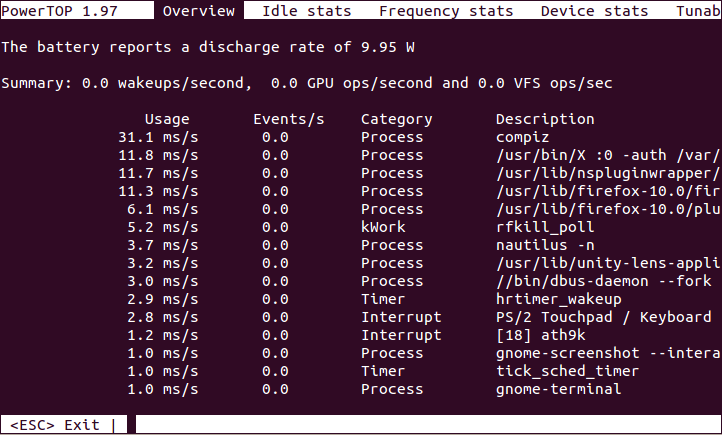
- Powertop Screenshot
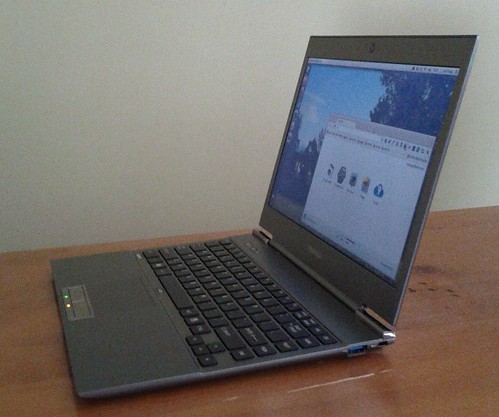
Turning the Toshiba Z830 into a Ubuntu Ultrabook
[ ](http://www.flickr.com/photos/leogaggl/6821823795/ “ultrabook by leogaggl, on Flickr”)
EDIT: Here are some tweaks if you install 12.04 (Precise Pangolin).
Since I will have to do a fair amount of traveling in the next year I was in need of upgrading my trusted workhorse of Toshiba Qosmio F60 to a more portable option that will be easier on the shoulders during long travels. After doing some research into which of the major manufacturers offer the best support for a Linux based Operating System it came down to a final two: the Intel i7 variants of Samsung Series 9 and the Toshiba Z830.
Install Microsoft Fonts on Ubuntu
If you have kids going to school you will know these questions:
- Why can’t you have Microsoft Office ?
- I can not find ‘xyz’ font on this …. – why ?
I have managed (after some time) to convince my kids that there is no need for having a particular Word Processing Software and they are much better off knowing the concepts of text processing rather than some particular office package. Unfortunately I have had no look convincing many teachers that they should follow a similar principle ….
Using Blackboard Collaborate (Elluminate) on Ubuntu
Like it or not (personally I am in the second category) Blackboard Collaborate or Elluminate (as it is still more commonly referred to) is something you have a hard time avoiding if you work in online education.
I discovered that I have audio issues on some Ubuntu Linux machines and found the following to fix the issues.
1) Install alsa-aoss
apt-get install alsa-oss
2) Save the Elluminate Java Webstard (.JNLP) file to a local folder – DO NOT OPEN IN BROWSER
3) Launch Elluminate using this command (in the folder you saved the JNLP)
Ubuntu - create manual application launcher (Unity)
With every new release of Ubuntu I am becoming more resigned to the fact that the effort to revert back to the Ubuntu Classic (Gnome 2) interface is getting harder and sooner or later I will have to bite the bullet and learn to live with the ugly and more cumbersome Unity interface (specially since Gnome 3 seems to be even worse). One of the first issues I found is that there seems to be no easy way to manually add programs to the “Launcher” (as well as to the applications list).
Installing Java6 JDK on Ubuntu 11.10
UPDATE: To install on 12.04 (Precise Pangolin) you need a different PPA.
Since sun-java6-jdk has been removed from the default Ubuntu 11.10 (Oneiric Ocelot) repositories you need to add a PPA repository (unless you want to install by hand)
sudo add-apt-repository ppa:ferramroberto/java
sudo apt-get update
sudo apt-get install sun-java6-jdk sun-java6-plugin
Back up Google Apps Mail using getmail4 + IMAP
Just a quick note on how to configure backups of Google Apps email to a local machine.
Install getmail
apt-get install getmail4
create config directory
Create a subdirectory in users home folder (and change permissions)
mkdir .getmail
touch .getmail
create config file
Create a file such as .getmail/username.gmail
[retriever]
type = SimpleIMAPSSLRetriever
server = imap.gmail.com
username = username@domain.tld
password = password
mailboxes = ("[Gmail]/All Mail",)

[destination]
type = Maildir
path = /path/to/storage/directory/

[options]
# print messages about each action (verbose = 2)
# Other options:
# 0 prints only warnings and errors
# 1 prints messages about retrieving and deleting messages only
verbose = 1
message_log = ~/.getmail/gmail.log
create data directories for storage
Create 3 sub-directories in your designated data directory
Running your business (mostly) on Open Source Software
The release of the latest Ubuntu Version has been seen by a number of commentators as the most end-user friendly yet and signals another milestone in the readiness of Free and Open Source Software (FOSS) for more widespread (and business) use.
As a long-term user of a number of different Operating Systems and as SME Owner for the last 15 years I have overseen the gradual replacement of a number of proprietary software solutions with FOSS Alternatives. With the beginning of the new financial year however, we are planning to go another step further and are starting to change our default Operating System to Ubuntu (from MS Windows).