Installing Ubuntu: Extending the HP Touchpad
As one of those who grabbed a HP Touchpad at the recent firesale (after announcing the killing of the product line) I did it as in full knowledge that this device in it’s current form is of limited use and (highly) unlikely to have lots of additional applications created for it.
After casually using it for a few nights of use I am personally not surprised that HP decided to ditch this product. Compared to the current Tablet leaders the Touchpad is miles behind both Android and iOS and HP would have had to spend serious money to even get close to the current functionality of the competition. And you can take a bet that both of these will not remain static. I was actually hoping that WebOS can be a serious competitor to the current duopoly, but after using this thing I have to say that it is not even close.
Upgrade to Firefox 4 on Ubuntu 10.04
Since some older hardware (Toshiba Satellite A300 for example) has issues with the current version of Grub as well as the newer Kernel I still need to run 10.04 on some machines.
However since the 10.04 Repository still uses Firefox 3.6 you need to add a PPA repo to upgrade to Firefox 4.
Either go to Ubuntu Software Center > Software Sources and click the ‘Other Software’ tab. Press ‘Add’ and enter ppa:mozillateam/firefox-stable
Install Handbrake on Ubuntu
Note: this has been verified to work on 11.04 (Natty), 11.10 (Oneiric) & 12.04 (Precise)
To convert a DVD and make it viewable on your mobile device Handbrake seems to be the most useful tool I have discovered so far. Since it is not part of the default Ubuntu Repositories here is the installation process. The first step is to insure libdvdcss2 is installed
sudo apt-get install libdvdcss2
sudo add-apt-repository ppa:stebbins/handbrake-releases
sudo apt-get update
sudo apt-get install handbrake-gtk
VoIP client for Ubuntu II
After upgrading to Ubuntu 11 (Natty) I did some further research on VoIP clients (SIP) for Ubuntu Linux as XLite seems horribly out of date now.
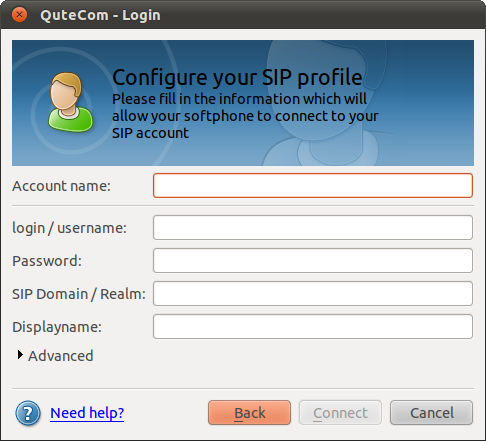
I came across QuteCom (formerly WengoPhone) and from first testing it seems to work quite well. The install is easy as it’s part of the Ubuntu Community Software (Universe) and that means it can be installed via apt-get, Software Center or Synaptic.
GoogleApps (Gmail) as default Ubuntu mail client
Keeping mail on a local machine does not make sense when working across a large number of different (vitual) devices. As a GoogleApps user I have long preferred browser based mail client as my default.
Unfortunately this is not yet a very straight process on most Operating Systems and Ubuntu is no difference.
Edit: all the commands need to be run with root privileges. so either run “sudo su” or prefix all with “sudo ” (thanks to Paul for the comment below)
KeePass Version 2 on Ubuntu
EDIT: As of Ubuntu 11.10 (Oneiric Ocelot) this is now much easier as KeePass 2 has finally made it into the repositories
apt-get install keepass2
————————————————————————————————————-
If you need to read KeepPass 2 data files (.kdbx) on Ubuntu (as well as from other platforms such as Windows or Android) you need to run the Portable Version under Mono (.NET Runtime). Make sure you download the Portable Version 2.x from http://keepass.info/download.html
The default Mono Distribution on Ubuntu (V11 Natty) is missing a few dependencies required for KeePassX
Revert Ubuntu Netbook UI
If you upgrade you Ubuntu Netbook release to 10.10 (Maverick Meerkat) you will notice a change to the new ¨Unity¨ user interface.
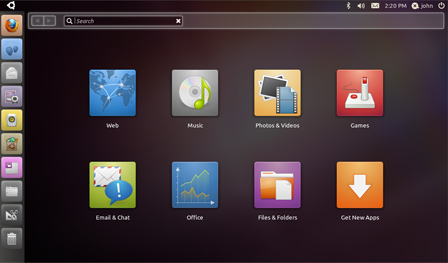
Personally I think the new interface is absolutely horrible (from a usability perspective) and I wanted to revert to the previous Netbook-Launcher.
HOWTO
Install the required components via terminal:
sudo apt-get install netbook-launcher-efl
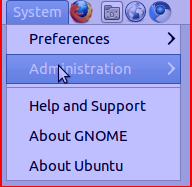
After install just change the “Login Settings”
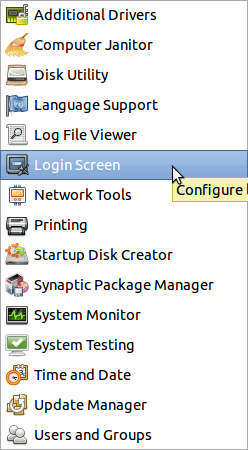
Log out and after the next login: voila – the laucher interface:
VoIP client for Ubuntu
Having used IP Telephony for a number of years I need a workable SIP client for all of the devices I use. I have found a very capable client for my Android phones (SipDroid) and on Windows/MacOSX I generally use X-Lite (as well as it’s paid version EyePhone) from Counterpath.
Having tried several different Linux SIP clients (Ekiga, Twinkle, …) but all discarded them because of weird UI’s and/or problems with stability I noticed that there is a Linux version of XLite available. Unfortunately on current versions of Ubuntu (10.04) it needs a deprecated version of a library.
Huawei K3765 on Ubuntu 10.04 (Lucid)
Since I have switched my 3G data network from Hutchinson Three to Vodafone AU recently I also upgraded the USB modem from a Huwaei E220 (which used to work fine on recent Ubuntu NBR releases on my trusty old ASUS EEE 900)
Unfortunately the new Huawei K3765 would not be recognised as a valid modem by the network manager. After a fair bit of searching it turns out that you only need to install one additional package (usb-modeswitch) to make this modem work (be recognised) on the current stable 10.04 release:
Ubuntu - Google Mail (GoogleApps) as default mail client
Since Ubuntu 9.10 NetbookRemix has been released I am again finding myself using my trusty old ASUS EEE when on the road. And finally it seems I have found a vanilla Linux distribution that is reasonably responsive and works ‘out of the box’.
One thing I don’t need on the road (as a matter of fact on none of my equipment) is having to install & maintain some client/server mail client. Here is a workable solution to have your browser default ‘mailto:’ links to Google Apps.
Ubuntu - the ‘old man’ experiment
Recently my father, who has so far not wanted to have anything to do with computers, decided to change all of this with age 67. While initially surprised (and remembering the comments I got when sitting in front of computers as a teenager instead of working on the family farm), I quite liked the idea. It’s a great to see him still wanting to explore and learn new things.
Unfortunately since there is approximately 17.000km between us, there was a limited amount I could do to help him get set up. So my eldest sister (as she always has to do) ended up having to help out instead. Finding hardware was the easy part and very cheap these days (and since it was bought online I could help with the technical aspects). However the machines in that particular shop came as white-boxes without an Operating System (which is a good thing in my book).
Finding the ideal OS for (my) EEE PC
I have been a user of an EEE PC 900 for over 10 months now and in general very happy with the form-factor and it’s portability. I has been very useful in public transport, waiting rooms, coffee shops,…
However – in terms of Operating Systems I am now on my 3rd OS (despite initially telling myself that I will stick with the default and avoid tinkering) and it looks like I still have not found what I am looking for.